logo-bg

Income Diary

The Ultimate Guide To Building a Successful Blog | Your 30 Day Plan!

The Ultimate Guide To Building a Successful Blog | Your 30 Day Plan!

Fast Start Blogging Success

Today I wanted to present my own personal plan for Blogging Success – a plan that could be followed and executed in as little as 30 days and one that, new, intermediate and even experienced bloggers can get value out of it. This is pretty well the complete system I used to create IncomeDiary.com.

My Blogging eCourse has helped 1000′s get online and become bloggers but with this 30 Day Plan I wanted to create something that will help the newbie blogger follow on from the eCourse while also acting as a reminder to all us experienced bloggers.

Special Note: I am calling this a 30 Day Plan and all the steps can be completed in 30 days – but of course if your preference is to take things slower and take longer over it, that is possible also.

My Goal here is to help as many people as possible make their first dollars online in 30 Days or less and remember:

The longer you’re not taking action, the more money you’re losing

I should also say that the ORDER of Tasks is only a suggestion – this is the order that I would suggest but if you are an experienced blogger you may well have accomplished some of the days tasks already.

Additionally this is a post I intend to update on a regular basis. I might even create a book out of this post at some later date. You will note that with some topics I have gone into more detail than others, simply because I had not covered those topics in much detail before. My main goal here is to go beyond what appears on the Blogging eCourse so topics covered on the eCourse will get for the moment slightly less attention here.

I also encourage you to keep with The Plan – for some of you there will be a lot of new material here, stuff you have never come across before even, but a curious mind is a great help with learning and the more you learn about blogging, the more you will make online

This has been a great post to put together, a sort of MASSIVE TOP LIST in some ways. Please don’t be overawed with the amount of tasks – the important thing is to complete the tasks and even if it took you 30 weeks rather than 30 days you will ultimately be a far better blogger for it.

Also in particular note my Day 17 Contest and my offer to all of you who comment on this post before 15th June 2010.

I am also fully aware that sometimes new bloggers think they cannot replicate my success or that of other Pro-Bloggers – but really it is never to late to start. Indeed in some ways today is a better time to start than ever because there is more help available than ever and also remember what I have done with IncomeDiary.com has been accomplished in just over 12 months. Oh, and at the risk of repeating myself – if a 21 year old, dyslexic, college dropout like me can do it — why not you?

UPDATE: Since creating this post, 1000′s of people have taken part and enjoyed the guide, however so people have asked for more. I highly recommend you check out Become a Blogger which has all the tutorials and videos you will need to set up your blog, monetize it and then drive traffic to it. The program was created by Yaro Starak and Gideon Shalwick who I both know and was able to organize a $1 trial for all IncomeDiary readers so that you can try it with practically no risk!

product buy The Ultimate Guide To Building a Successful Blog | Your 30 Day Plan!

Let me know your thought and comments on this post — and of course your questions about any specific days task. As I said, I will be expanding on this post so your feedback will be a huge help in that respect.

To Our Success

Michael

PS: Before you start, you may want to briefly read my Blogging Start Up Mistakes.

Blog Your Way To Success – 30 Day Plan

Day 1: Getting Your Blog Online

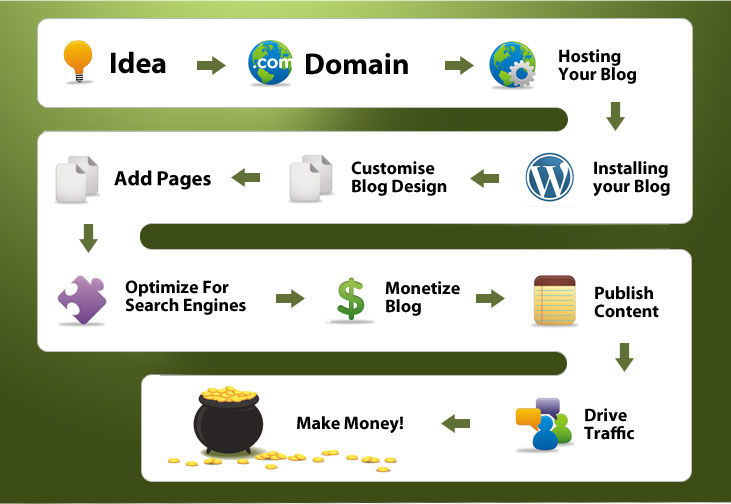
It’s real simple, all you need to do to get your blog online is to buy your domain name, your web hosting, connect them together and then install your blog. If you have not already done so – you should also get my 7 Day Blogging eCourse

I personally recommend you:

Buy your domain from GoDaddy for $8.99/year and you can receive a 10% discount when you use the coupon code: cjcsave10

Buy your webhosting from HostGator for $4.99/month and you can get your first month for 1cent when you use the coupon code: Retireat21

Once you have done this, login to your GoDaddy account and update your nameservers with the ones HostGator gives you. After this all you need to do is the 10 second WordPress install from your hosting CPanel – as detailed in this Post

Day 2: Editing Your Theme Preferences

Once you have installed your blog you need to choose and install your theme. I personally use and highly recommend Woothemes.com. Choose the theme of your choice and then to install it, log in to your WordPress Admin and on the sidebar you should see a tab called appearance, then click Add New Theme. Once there, go to the top and click Upload, find your theme file and click Install Now. To set it as your theme, go to Themes and activate it.

If like me you’re using Woothemes then you should now see a button at the bottom of the Admin sidebar with the name of your Theme. Here you are able to play around with all the options of your theme, add advertisers, choose the size of images, featured posts and more. As well as this, you need to go to the Widgets page which is also under Appearance and drag the widgets you want to use for your blog.

Another thing I suggest you do is go down to settings and click discussion and tick the box, Enable threaded comments – this will allow readers to reply to specific comments. Another way to improve the look of your comments is to have a picture of you next to your comment, you can see that I do this on my blog. Most themes come with this already installed, however every user has to set their picture themselves at Gravatar. Once you have set it up, it will update all past comments on every blog with your picture and will include it in any future ones.

Day 3: Customizing Your Blog Design

I have used dozens of designers in the past, a lot come and go and it can be really hard to keep just one. However for those of you who don’t know where to get designers, here’s what I would do.

I would start by visiting TalkFreelance, which is a design forum, they have a few good designers looking for work, click here to see those people. If that didn’t work, I would try other forums such as Sitepoint, Digitalpoint and WarriorForum.

If it was just a header or logo change I needed, I would probably opt for a design competition, either at http://99designs.com or http://logomyway.com where you can sometimes get over 500 entries for your contest.

Day 4: Adding Logos, Favicons and further customizing your theme

OK, so you have had a designer create a logo for you or you have made one yourself. If you are using Woothemes then this next bit is quite easy. Just click on the name of your theme in the LH menu of your Admin area and you should see [Theme] Options. The screenshot below is from my RetireAt21.com site where I use the the Headlines theme from Woothemes

edit themes 2 The Ultimate Guide To Building a Successful Blog | Your 30 Day Plan!

Editing a Wootheme to add Logo etc

What is a FAVICON ? — check out: http://en.wikipedia.org/wiki/Favicon

Again this is a topic that we could make into a much bigger topic — but we are taking little steps here, you can learn more and improve more another day.

You can also of course get a designer to do this work for you – see Day 3 above

Day 5: Installing Plugins and Other Edits

Every blog needs a selection of WordPress plugins to make it run more smoovely, the ones I use are below, but there are 1000’s to choose from at WordPress.org

  • Podcasting Plugin which allows me to add a player to blog posts so people can play our audio interviews.
  • WP-ContactForm which is basically a contact form and really simply Plugin that works perfectly. For anyone who has tried to create a contact form on a normal website, you will realize just how hard it can be.
  • Comment Notifier which is basically an RSS feed for comments, alerting people who subscribe when there are new comments.
  • All in One SEO Pack which basically makes optimizing your blog for search engines really easy.

And if you not already done so – get yourself an AWeber account. Having an Aweber is essential when you start building your email list

Day 6: Creating Your Contact and About Page

These are two pages most people forget about but when I checked my stats, these two pages get some of the most traffic. People want to hear your story and what your blog is about, make sure to provide them with the information they are looking for. Secondly with your contact page you want to remember to include a contact form, a possible email, postal address and any social sites you are on. I have an office address as I didn’t want to put my home address up on the site. This proved to be a smart move because I often get sent free things companies and letters from readers.

I have two About Me pages and you can check them out here:
http://www.incomediary.com/about

http://www.incomediary.com/make-money-online-my-personal-story-how-i-created-incomediary-com

To add a page to your blog, go to Pages >> Add New. Once there it is really simple, just add the title of the page, for example “Contact Us” and then put the page details. For those of you who downloaded the contact page plugin I suggested, you can add a form by putting in the code: <!–contact form–>

Day 7: Styling Blog Posts

There is again much we could cover here — most people use the Visual Editor to create their posts and it works very well but I suggest you look at the code occasionally under the HTML editor.

You don’t need to know every bit of HTML code but knowing a few bits of code gives you a better understanding of web-pages and also of Search Engine Optimization.

A very simple option you can go with is to use H Tags for Headings / Important sections in your blog post. For SEO reasons I won’t explain in detail here it is also handy if you include some of your important keywords within those Tags.

See Screenshot below for example of how I used H2 Tag in this post:

H2 The Ultimate Guide To Building a Successful Blog | Your 30 Day Plan!

HTML Editor In WordPress

This is H1 Heading

/

This is H2 Heading

/

This is H3 Heading

Initially I suggest you just do a dummy post and play around with it – trying different styles and previewing it to see what you like. The great thing about WordPress is that you can save a draft and preview your changes

Note: I am only going into the simplest of stuff here – but it will I hope inspire you to find out more. (To be curious and learn even more)

If you fancy becoming a bit of an HTML Nerd (not essential) they you will find lots of simple code you can use on this Cheat Sheet

Also check out my Blog Post here for some of the more advanced styling options you may like to consider adding to your blog down the line:

http://www.incomediary.com/make-your-blog-stand-out-from-the-crowd

Day 8: No Leakage Rule

This is something I speak about a lot, in particular in one of my most recent posts ( http://www.incomediary.com/how-i-made-5000-in-the-first-month-with-a-brand-new-blog ). In simple terms, you don’t link out of your site unless it a commission earning link. i.e – you don’t have a blogroll, you have no advertisers and when you do link to someone, it should be an affiliate link. You then focus on funneling them to the pages that convert highest for you such as your squeeze page/optin box and affiliate posts, this way they either clicked to close their browser or they make you money.

Typically when you link to someone else, such as your advertisers and “friends/blogroll” they are competitors.

OK, I am simplifying things a lot here. I am not a fan of selling advertising on this site because when I do that I am accepting a ‘guaranteed’ but relatively low amount from an advertiser when if I did my job correctly I could earn far more on an affiliate commission offer.

That said, as I will mention later you may wish to consider selling advertising (as I do on RetireAt21.com) – but I personally think it limits your earning potential.

Day 9: Finding Affiliate Programs That Work

There are 1000’s of make money online products that I could promote but to make any money from it you have to pick a product that offers great value and converts well. Firstly I wouldn’t put all your eggs in one basket, I would choose at least two, preferably one low price point of around $30 and one higher at around $200.

There isn’t any sole place to find products, my top tip is to find products you like and then visit there site and scroll to the bottom, and usually they will have a link saying affiliates with details on how you promote them. A lot of the products I promote come from ClickBank and Commission Junction (CJ) which is basically a marketplace of affiliate programs.

So once you find your product, what makes it convert well? If we knew that, we would all be a lot more well of, however from my experience this is what works for me:

  • $1 Trial Offers
  • New Products – being the first to promote a new product or service gives you a HUGE advantage.
  • A well known brand – most people in America have heard of the GoDaddy adverts, because of that, they by far out pull any other domain registrar I promote.
  • The Best Product – I promote loads of theme companies but WooThemes converts the best because they are simply the best.
  • Proof It Works – When it comes to the eBooks I promote, the sales page with a real bank cheque in completely destroys the other sales pages.

These days before promoting any offer I always check out the Sales Page – I have come across some great products with lousy sales pages that have ended up earning me very little. Ask yourself – would this sales page convince me? If it doesn’t convince you then it is unlikely it will convince your readers.

Day 10: Creating Your First Affiliate Post

Affiliate posts are really just like this one, you provide great information on something and at the same endorse a product that you use and know that works. A lot of my income these days comes from blog posts that were created months ago. When you first start out you may not see much point in doing a promotion just to make a few bucks here and there – but I promise you after not too long at all, these amounts add up!

Today I want you to create a post with Affiliate links. Here is how I did mine:

  1. Find a product you are promoting that out performs anything else, in my case it’s Market Me Tweet which allows users to easily build a HUGE twitter following.
  2. Write a post on how you use the product to benefit you.
  3. Softly promote the product and give alternatives, this way if they don’t buy the one you suggest, hopefully they will go for another you mention instead of going else where to find one.
  4. Keep referring back to this post when ever someone asks you about Twitter or when you mention Twitter in another post.

I bet you didn’t think it was that simple? It really is, so many people think there is some secret to making money blogging but all you have to do is monetize value.

Day 11: Adding Recommended Products / Becoming an Affiliate

OK this is related to Day 9, but I thought I’d include some additional resources, especially if you are struggling to find affiliate offers to promote.

You know I am amazed the number of people who have started a blog with the idea of making money from it – without fully researching just how they are going to make that money.

Don’t start a blog for fun and profit (as opposed to a fun only blog) unless you have first considered how you will monetize the site.

I cannot possibly know everyone’s Niche but I am going to make a few suggestions that will at the very least get most people started with affiliate marketing.

Clickbank.com

Amazon.com

Ebay.com

Google Adsense

I like Clickbank a lot because the commissions are decent — 50% in normal and even 75% is possible. Additionally you can create your own product to sell on Clickbank and have the Clickbank army of affiliates promote for you.

Note — the only one I give serious consideration to these days is CLICKBANK but if you are in a Niche where you get a large number of visitors but are finding it difficult to monetize the GOOGLE ADSENSE is well worth considering

Of course it is much better if you have your own unique product to offer or you can find more specific offers for your niche. The more specific the offer the better the conversion, so it is worth while searching out some Special Products to recommend.

Another Note: Only promote products you believe in and would genuinely buy yourself. I regularly turn down affiliate offers just because I don’t like the product being offered.

Day 12: Add An Advertising Spot To Your Blog

Most of the time I like to promote affiliate products because I have a better opportunity of making more money, however sometimes it’s good to have guaranteed money. All WooThemes come complete with an advert manager that makes it easy to add/edit/delete advertisers. I suggest that until you find paying advertisers, you promote affiliate products in these Ad Spots and leave one spot for a banner saying Advertise Here. You can see an example of how I do this at RetireAt21.com (Of course it is better still if you are sold out and don’t need to have an “Advertise Here’ banner displaying.

R21adverts The Ultimate Guide To Building a Successful Blog | Your 30 Day Plan!

Advertise Now - RetireAt21.com

TIP: When looking for affiliates adverting banners, I use Google Images and search affiliate product name, followed by 125 x 125, so for example Bloggingtothebank 125 x 125. This usually brings up a great selection of banners.

Another thing you want to do is add a advertise page which you link your banner to and in the header of your site. I would highly recommend copying my advertise page on Retireat21, it has worked very well for me.

Day 13: Creating a Affiliate Comparison Page

This is a technique I see nearly no one doing and has proven to work well for me. The first time I tried it was on Retireat21, I was earning around $1000 a month at the time just from banner adverts, adding this page doubled my income over night. The idea behind it is really simple, for whatever niche you are in, you have tried and tested lots of products, for me it was WordPress themes, domains, hosting and the list continues. Now telling your readers just to go buy these and take your word for it, typically isn’t good enough. What I did was compared them to the other products in a table, so they could see clearly which offer to go for but even if they didn’t pick the one I recommend, I would still make money from the other product they went for instead. Check out one of my comparison pages here: http://www.incomediary.com/blogging-resources

Day 14: Adding Your Funnel System / building your mailing list

This is covered very nicely in other posts and it is such a huge topic I would be doing a disservice by only skimming over it here – so please check out the following post: Making Money with Email Marketing and an Autoresponder Series

and this Video:

My Biggest Tip Here: sign up for the AWeber and get their email marketing software to help you automate email follow up / newsletter delivery.

Day 15: Promoting a Product Launch

Once your funnel system is up and you’re getting optins, you now have another way of monetizing apart from the auto-responder. Sometimes when I see a product I like and think it’s provides value, then I will email my list, mentioning why they should buy it. This is a value of thousands of dollars every time I send it out, so say you just did it once a week, that’s an extra $4000 of monthly income. I would also like to point out that you don’t need a huge list, it’s the quality of the list.

Day 16: Create a Blog Post Plan

What I did when I started this site was put together as many post ideas as I could and then picked all the best ones. I still do this, usually on a flight when I can’t do anything else but it’s vital because it gives you enough work to do for at least the next 3 months.

For those who are thinking it, yes I did come up with this post on a flight icon wink The Ultimate Guide To Building a Successful Blog | Your 30 Day Plan!

Day 17: Have a Blog Launch Contest

Setting Up A Contest – The Basics

To get the most interest and interaction keep the following in mind;

a) Simple Tasks (eg commenting) get the best response
b) As few rules as possible – but do make sure to have rules
c) The deadline to end the contest should not be too far in the future – no more than one month (but no less than a week)
d) Don’t just announce it on the blog – email your list, tweet it, Facebook it, get friends to mention it etc
e) Finally and MOST IMPORTANTLY — make your contest EXCITING – with strong copy and excitement and value that will encourage people to get involved.

When I first launched RetireAt21.com back in 2007 I ran a launch contest to build up Buzz and awareness for the site – it cost me and my sponsors a little money but it was well worth it.

But it does not have to cost very much at all – you can find sponsors or you can put some simple prizes for example your Top Commenter (Simple prizes – e.g. Amazon.com vouchers)

If funds are limited a contest need not cost you more than $100 in Total Price Fund – but if you can attract some good sponsorship the perceived value can be $1000′s

For more Competition ideas — Check out this Contest Ideas Post by Liz Strauss at Successfuf-Blog.com

Some of Liz’s ideas that I like for competition ideas are:

If they made a movie of my blog, it would be called ____ and ___ would play the main characters.
The theme song of this blog should be ____.
The official rock band of this blog should be ____.

Something Important – you can if you wish have launched your Blog before launching the Blog Launch Contest. Indeed, I would actually recommend that, as hopefully if you have been doing all the other things I have been suggesting, you will already have some following and traffic.

In other words launch a Beta Version of the blog first and then follow that up in a Full Launch and a Launch Contest.

More Help:

Darren Rowse over at Problogger.net has written an excellent article on How To Run A Blog Competition – well worth checking out for additional ideas.

TOP TIP

You can run a contest anytime – it doesn’t just have to be at Launch. For example if you are doing a BIG POST or a series of posts you can for example offer some sort of prize or bonus to everyone who makes a comment on your post. And the more comments you get the more interaction you have and the quicker you build up a sense of community.

Indeed – I am planning to shortly convert this Blog Post into a PDF report – adding some additional resources and information and I shall Offer everyone who comments on this post before 15th June 2010 – a copy of my new report as soon as it becomes available – Blogging To Success – The 30 Day Plan, just for commenting.

Day 18: Requesting Interviews

When I first got started this was my main way of getting noticed by other bloggers. I conducted 100′s of interviews at RetireAt21.com – mainly just using email. Later I moved to recording calls over Skype and Video (always getting the recordings transcribed – which is very important for good search engine content)

I get a lot of people asking me about interviewing and worrying that the people they request interviews of may refuse. Well everyone you don’t ask is going to refuse – that is for sure. It is a numbers game – once you land your first big interviews it becomes much easier to get more interviews. I discuss interviews in some detail along with Tips for creating great blog content in the video below:

Also well worth checking out is another post over at ProBlogger.net:
http://www.problogger.net/archives/2009/06/11/how-to-land-big-interviews-when-your-blog-is-still-small/

Day 19: Conducting Your Interviews

I have conducted 100′s of interviews and the key to a successful interview is asking the right questions. Make sure you do your research before you ask the questions and if you are doing it over the phone or Skype, make sure you leave room to ask questions depending on the responses you get back from the interviewee.

Day 20: Optimizing Your Blog For Search Engines

Another BIG Subject, worthy of an extended post. Such an important subject that all I am going to do here is FOCUS on one element of it, which is the importance of using the most search engine friendly TITLE (Title Tag) you can for your blog post.

The Title Tag of your web-page or blog post is what you see at the very top of Your Browser and also almost always what the search engine uses to display and rang your page in its search result. See example of a search for ‘young entrepreneur’ below to see how the Top Results each include the Key Term searched for in the TITLE. Indeed I would go as far as to say it is almost impossible to rank TOPS for a significant keyword without that Keyword appearing in you Title.

title tag seo The Ultimate Guide To Building a Successful Blog | Your 30 Day Plan!

In WordPress the Title of your Blog Post is usually also the TITLE TAG. There are ways around this for example by installing the All in One SEO Pack which allows the TITLE of your post to be different from that which is displayed at the top of the Browser (as the Title Tag).

This is a good thing if for example you want to use a Fun / Catchy Title for the blog post (which doesn’t include many keywords) but want to have a powerful TITLE TAG that includes KEYWORDS.

Now, I know this is confusing – so I am going to stop now – put simply it is best you remember to use KEYWORDS and likely search terms your visitors may use to find you when deciding to name (Title) your blog post – unless you have installed the All in One SEO Pack

Also highly recommended on this deep subject (and allow yourself sometime to read and understand) is this excellent at Yoast.com

WordPress SEO

Day 21: Create Your First Top List

It’s no big secret that I love creating top lists, they just bring so damn much traffic, I can’t resist. Today I want you to create one of your own, here are a few suggestions:

  • Top Earning Women in Sport
  • 10 Reasons It’s Great To Be a Guy
  • 30 Most Influential People In Design
  • Top 30 Golf Blogs

You will notice that all of these examples could be used in any niche and if for some reason you don’t think it will work, then post below and I will give you a example of one for your niche.

Lists work because 1) They get visitors attention, 2) They are easy to scan, 3) Easy to read, 4) very easy to understand and above all EASY TO REMEMBER and pass on / re-tweet to friends.

Day 22: Create an Educational Post

It surprises me how many people – who claim to be experts in their niche, who seem reluctant to share what they know in real depth. It is almost like they want to be recognized as an EXPERT but they don’t want to share their KNOWLEDGE.

Folks that is not how this blogging thing works. Today, more than ever you must first GIVE in order to RECEIVE.

Failure to SHARE is in my opinion an example of Poverty Consciousness. I have people who ask me for advice about blogging openly saying they don’t want to let out the really good stuff in public. If you are in a niche where there is little FREE Info you may get away with that – and you can charge for what you know, but really those types of niches are becoming fewer and fewer.

Imagine where I’d be today if I had not been prepared to share what I know?

If you check IncomeDiary.com over you will see that a high number of my posts are EDUCATIONAL / HOW TO posts. But the interesting thing I have found is that the more info I put out there the more requests I get for speaking, workshops, private coaching and mentoring.

Think of your Educational Post as a SALES TOOL – a way to connect with potential clients who will in turn buy your more in-depth services because they are impressed with what you are giving away.

Check out some of my educational posts:

www.incomediary.com/my-6-figure-blog-content-strategy

www.incomediary.com/unusual-cheeky-and-fun-ways-to-get-inspiration-for-your-blog-posts

In summary – to be considered a real expert and an authority in your niche you have to demonstrate what you know. That is what Educational Posts are about.

What do you know? What problems can you help people solve? Answer those questions and you have an educational post.

And of course your educational posts can earn you affiliate commissions as well – as well as providing a useful service to your readers.

Day 23: Getting the most out of a blog post

Today I want you to ‘rest’ for a few moments and think about “How do I get the most out of a Blog Post?”

The obvious answer for some would be how do I place more affiliate links in the post – or find associated related resources (and products) that I can recommend to my reader.

Well, that would only be part of the answer because I would like to challenge you to think like THE VISITOR.

How could the visitor get more out of your post? How can you improve your post for your visitors benefit? That really should be the only question you ask, because when you do that,the rest (including additional products to promote) will take care of itself.

How can you deliver your reader more value?

Day 24: Driving Traffic From Twitter

There is no real logic in having this under day 24 – because of course if you have been following my videos such as 1000 Visitors A Day – Blog Traffic Secrets you will know how important I consider Twitter. So consider this a reminder – especially if you have been neglecting Twitter recently.

Check out my specific Twitter Post at
http://www.incomediary.com/twitter-tips-and-tricks-to-drive-traffic-to-your-sites and make sure to BUY MarketMeTweet (essential for TWITTER)

Talking of Twitter and email lists and such things I just got the following message from Mark – a long time subscriber:

I’ve been subscribed to one of your lists now for ages, probably going on 2 years I reckon, and I’ll be honest, I never really paid much attention to your emails. Anyway… recently I’ve been tuning in a bit more (glad I did too!) and I’ve actually started my own blog now! – One of the videos you did on Traffic seemed to completely simplify the process – I’ve just got hold of that Tweet Adder software, and I’m already getting a load of followers and it’s day 1. LOL!

Mark proves a great point here – one I have been aware of for sometime – People don’t always act straight away, even when it appears in their best interest to. The important thing is that Mark has now taken action and I am sure you will find many of your own subscribers are similar.

Day 25: Creating Posts Search Engines Will Find

OK, on Day 20 we went over Optimizing Your Blog For Search Engines (SEO) but this is such an important subject that it deserves your attention on at least 2 days out of this 30 Day Plan. Actually you should be thinking SEO all the time with every blog post you write.

Anyway – here is some additional help via Nathan Rice – well worth a read
http://www.nathanrice.net/blog/ultimate-guide-to-wordpress-seo-optimized-heading-tags

I will admit that I am a little concerned that not all that I am covering in this 30 Days is being understood by everyone, especially with regards to SEO so I encourage you to email me Your Questions. I cannot promise to answer every question individually but your feedback will be used to improve on this Guide, the PDF Report and the book I may eventually write.

Day 26: Making Your Blog More “Sticky”

If you have been blogging for a while you are bound to have heard the terms’ “Make your blog sticky”

But what does sticky mean? Well for me it means the following:

a) Producing content that interests and intrigues my visitors so that they ‘stick around’ to see more of what I have to offer
and
b) Most importantly having strategies to bring those visitors back.

It is often said that you only have one chance to make a good impression – and I am afraid the same is also true on a website.

It is difficult for us as website owners to view our websites as a NEW VISITOR – but it is something I regularly try to do. Pick and page on your website and ask yourself: What is intriguing about this webpage? What makes me want to click on the links and navigate the site? How are visitors able to interact with you? (Opt-in, join mailing list, subscribe to RSS etc)

Making your website sticky is perhaps one of the biggest and most important topics in blogging and I do at a later date plan to do an extended post on this topic.

For now I will just highlight a few key points:

1) Have multiple ways for people to connect with you – by offering free reports, Tips of The Week, RSS subscribe options etc. This is vital if you don’t want that first time visitor to become a one time only visitor.

These days I get a lot of traffic from the search engines – often taking visitors to posts I wrote some time ago. If I am to connect with these visitors and get them to STICK around so they see more of what I have to offer then there needs to be multiple ways to connect – and not just some obscure subscribe link hidden away at the bottom of the page.

Have a look at my current design to see the ways I encourage people to connect with me.

sticky websites The Ultimate Guide To Building a Successful Blog | Your 30 Day Plan!

Encourage Your Visitors To Connect With You

2) Make your website interactive – encourage comments, have competitions, polls etc

3) Have and ANGLE and be YOURSELF – add personality to your website by being authentic and genuine and caring. OK, for some of us we may have to ‘exaggerate’

Today we don’t have to be PERFECT in order to be considered an AUTHORITY or a GURU — I actually make a big point of some of my limitations and it appears people like what I say all the more for it.

I present myself as being a:

Dyslexic,Young Entrepreneur, Internet Marketer, Adventurer and Blogger who invites you to start making an additional income online today, full-time or part-time

Day 27: Connecting With Readers

Readers like to feel special! They like to be recognized and remembered. When I visited Gary Vaynerchuk in New York he showed me that when people commented on his blog, he would sometimes personally reply to their comment via email, thanking them for reading and reached out to them. Gary is also very good I have discovered in responding to comments in other blog posts that feature him.

To be honest – I don’t know were he gets the time – but then he hustles more than just about anyone else I know.

You can bet your dollar that if you had that experience with the author of a great blog that you would return often and would make sure to comment again.

We don’t always get the time to respond and I struggle myself from time to time, but responding to blog comments is one of the best ways I have found to connect more directly with my readership.

Day 28: Connecting With Other Bloggers

Not sure why this appears as a Day 28 task – because frankly it is so easy to do.

Many bloggers live a lonely existence working at home – but online I find most of them are very sociable, welcoming email and interaction.

We have already mentioned interviews. That is my favorite way to connect with bloggers I don’t already know in person.

Even just dropping an email to say ‘Hi, I enjoyed your site’ along with a quick comment is a nice way to start the conversation going. But please don’t draft up some ‘standard email’ that you shoot of to everyone – it is so obvious and I get them all the time (and they get deleted) – make your email stand out. Use clever subject lines (‘Hi’ is not a clever subject line). Explain what you liked about their site.

You can later follow up with an interview request if you wish. But first concentrate on building a relationship.

Chances are very high that is you interview someone they will blog about it or they will Re-Tweet about it. Or if you have become friends they will mention you in posts, link to your content (and you vice versa)

If you have a product to sell then they chances are good you can JV together / they can become an affiliate for you (and again vice versa)

TOP TIPS:

a) Sometimes people at the very top of their niche are difficult to connect with directly (harder for them to see what is in it for them) An alternative approach is to just write and say how much you enjoy their work and ask if there is anyway you can assist them? (Explain your talents, how you are just getting started etc)

And if it is practical for you – there is always the option of offering to work for free – just so you can learn and develop your own skills

b) Don’t forget FORUMS – great place to connect with other website owners and bloggers. Forums are also great places for getting ideas for future blog posts etc

Day 29: Perform Blog Testing

Testing is vital to the success I have had. When I first started online I admit I didn’t give it much thought but these days I am always looking for ways to tweak things.

It is such a huge subject and again one I will return to that for now I am just going to give you a couple of resources to check out

a) CrazyEgg.com – This is my friend Neil Patel’s website and it offers a very simple and easy way to find out where people click. Check out a Demo here — https://www.crazyegg.com/demo#overlay

If you know where people click then you are better placed to decide where to place your most valuable content / opt-ins

b) Install Google Analytics

Google Analytics gives you rich insights into your website traffic and marketing effectiveness.

Testing is vital to the success I have had, before testing I wasn’t making half of what I make today.

Day 30: Edit Your Blog Depending On The Results From Testing

If you are using products like Google Analytics and CrazyEgg.com you will have discovered lots of information about your blog which will allow you improve it even further.

To give you a quick example I noticed recently in Google Analytics that I was appearing on the second page of Google search results for a fairly decent keyword and knowing what I know about SEO and using All in One SEO PackI have tweaked my TITLE Tag so that I can further on my search result. (Not yet on page 1 but I am hopeful)

Below is an excellent video which compliments the last two days in particular. Testing can appear boring and it can even be quite frustrating at times – but it is what separates the amateurs from the professionals in my opinion.

Blogging can be as simple or as complicated as you wish to make it. Much of what I have explained over these 30 tasks will appear complicated to some but I should emphasis that thanks to the power of WORDPRESS as long as you are a decent writer and have worthwhile information to share there is an excellent chance you can achieve much success without even implementing 50% of what I have explained here.

That said – clearly somethings are more important than others so I will leave you with some homework – 5 Topics that will make a huge difference to your online success:

Top Lists, Twitter, Search Engine Optimisation (Especially your choice of Title Tag), Installing Google Analytics and Interviews

Congratulations – You Have Made It To The End Of Day 30!

To become and even better Blogger I recommend you check out the recommended reading below:

About Michael Dunlop

I'm Michael, I created this site back in 2009 and since then it's received over a million visitors from all around the world. We offer tutorials and inspiration for online entrepreneurs wanting to achieve more.

94 comments so far… Leave a reply

  1. Andrew @ Blogging Guide
    May 19, 2010 8:48 AM

    You always amaze me, Michael with the effort and advice you put into your blog posts. And this one is exceptional. A few things I would add (apologies if you already mention them): 1. Anti-spam/ Security. Improve your blogs security by adding the Login Lockdown and Akismet anti-spamming comments plugins. And change your login username from 'Admin' to something else. So many people are being hacked at the moment. 2. Add disclaimer, privacy policy and affiliate disclaimer pages - will make you more credible. 3. Keyword research. I would do my keyword research, day 1 - so my blog is initially set-up with the keywords I am targeting. 4. Permalinks. Change your permalinks from the default structure to something like: /%post_id%/%postname%/ 5. Create a free giveaway to build your list. 6. Get yourself a Gravatar so when you comment you picture is displayed. All the above sites will be updated when you publish a blog post. Hope that helps. Andrew

    • Michael Dunlop
      May 19, 2010 9:46 AM

      Hey Andrew, All but 3 is up there, I have never done Keyword research, I don't find it being to necessary, just use your common sense in what people will be looking for. As least that's how I look at it. Michael

      • Tiffany
        May 19, 2010 11:25 AM

        Very interesting. Just yesterday I was reading about keyword search and what you need to look for and long tail keywords. It was confusing and just way too much. Glad to know you don't use it. I actually found you searching for online female entrepreneurs or something like that. I've been following you ever since and look forward to each email. I always feel like you're talking directly to me. You're such an inspiration. My main business is online service based, however I'm looking to branch out and start making passive income as well. It's taken me a while to figure out my niche and what I like best. However, I've finally got it after much brainstorming. I know today's post will definitely help in making my blog even better as it's currently in the development stage. Keep up the great work!

        • Michael Dunlop
          May 19, 2010 11:32 AM

          Hello Tiffany, It is confusing doing all of that, search engines bring me 50% of my traffic and I haven't ever done any real search engine optimization or research. Just work on providing value and the traffic comes. Top 30 Female Entrepreneurs post you probably found ;-) Glad I have been able to inspire you, keep up the good work and let us know how you get on with your blog. Michael

      • Tom@Trout Fishing Information
        February 6, 2011 1:57 PM

        WOW - No real seo research etc... I have been bombarded with everything I have read to spend hours and hours on this and I have done and followed all steps for a 'Niche Market' and still can't seem to get to top 3 pages of Google although i am on page 4 for a post and keyword that isn't optimised for that particlular keyword phrase - wierd...! But then, do you do, or did you do tons and tons of backlinking to get traffic, which again seems to be what I need to do much more of as I really am not getting subscribers, or one every so often (month). Is it sending article after article to directories and having to create many many alternatives to the same article all around the internet etc, as I am running out of ideas with this so called niche I've chosen from some that should do well, from Niche Profit Classroom (Adam Short's company) You make it seem so easy - how come so many get very little progress over so long a time and effort? Many thanks Tom

  2. S Ahsan
    May 19, 2010 9:27 AM

    you keep impressing me with your awesome posts bro.. i was busy with my ppc and cpa but your post has brought me back to blogging :), this post is worth bookmarking.. cheers PS: the new look is superb...

    • Michael Dunlop
      May 19, 2010 10:19 AM

      Thanks man, glad you like everything :) Michael

  3. Ken
    May 19, 2010 9:28 AM

    Great advice Michael. Thanks.

  4. ivan
    May 19, 2010 9:36 AM

    Thank you, this is jut awesome!

  5. BloggerSpeed
    May 19, 2010 9:45 AM

    This is the most complete post to make a super blog. I perfectly love it Michael :-) Right now, I am starting my new blog on http://shortive.com/ I'll follow your guide to make it really success. Thanks again for making it so comprehensive LOL Tweet it!

  6. Clive at BlogBriefing.com
    May 19, 2010 9:47 AM

    Excellent, well thought out list. Great for me to do a 'stand back and think for a minute' review/overview of my own sites and how I could do better. The testing, tracking and analysis is my weak point I admit!

  7. Ramalho
    May 19, 2010 10:04 AM

    Hi WEB Family, Awesome content & very useful. I´ll follow your experience but let me emigrate to wordpress. Thanks for sharing Michael

  8. Dev @ Blogging Tips
    May 19, 2010 10:21 AM

    Another Awesome Post .. as usual. You are doing really awesome job. These is really killer guide and what about 404page? Thanks for sharing this great post Michael. Btw. Now incomediary is looking stunning :D !! Thanks, Dev

    • Michael Dunlop
      May 19, 2010 10:40 AM

      Hello Dev, When it comes to 404, have one of course but the best thing to do is just not have any broken links, to find broken links use: http://validator.w3.org/checklink Michael

  9. Albert
    May 19, 2010 10:51 AM

    Wow... All you have explained in simple steps… New bloggers must follow this method. Also the old lazy bloggers like me… :)

  10. Adam
    May 19, 2010 11:43 AM

    This is a cool and thorough post. I have the ebook version of your 7 day ecourse which I have been going through again recently and this is the perfect accompaniment. You have recently become my 'go to' guy in this area and I will be referring back to your work as I progress in my blogging activities. Cheers Adam

    • Michael Dunlop
      May 19, 2010 12:52 PM

      Hey Adam, That's great to hear :) I hope you enjoy the course and glad to know I'm your go to guy. Michael

  11. Aaron Darko
    May 19, 2010 11:45 AM

    You said all you have to do is monetise value! That is all you have to do. For my site I have learnt off you and it is doing well. People just need to implemenet everything you say because I am proof that it works! Nice clean eye catching site, should increase your conversions a lot more. Having a unique angle is KEY. Everyone is different and indeed unique so people need to share their personality more on their sites to attract more people. People love Reality - thats why reality TV is such a hit. So just be YOU and provide the best value you possibly can. Keep up the good work buddy!

    • Michael Dunlop
      May 19, 2010 12:53 PM

      Hey Aaron, Your a great student, keep up the good work and I hope to see big things from you in the coming months. Michael

    • Helen
      May 19, 2010 1:33 PM

      Hey.. wow you have a great blog.. and to think about it, you only started it recently! Good content, you got some great interviews going! Just a quick question,what are these forums that you mentioned where you met all these Internet marketers? Are there any forums like that in the UK or Europe or are they all in the USA??? :) Thanks

  12. Mark Sherris
    May 19, 2010 12:33 PM

    Great post Michael! Didn't expect to see my email in this post lol! - but it's all good! - And yeah I'm glad I did take action, I'm already gettin some decent traffic to my site: http://lovemoneyhatework.com Looking forward to more posts from you! :-)

  13. Helen
    May 19, 2010 12:39 PM

    An awesome post! I have been following your blog IncomeDiary for over a year now I think and honestly have not really gotten down to really taking any action. every post I read of yours from time to time is so inspirational. After each post I have this "I shall do this now" but somehow this motivation dies down with all the day to day work I got... :( Nevertheless - I keep coming back and reading... Now I got this motivation again. Just a little question. I have recently bought a new domain and design and am hosting on Wordpress. I have encountered a problem, I have used blogger before and could always change any of my html code of the site design, but I can't seem to find how to do that in Wordpress? I would really appreciate it if you could give a little advice. Where on wordpress do I do that? do I have to go to my ftp on Godaddy of is it in the admin panel? Thanks so much and I keep looking forward to more great posts! Also when I comment on your site, how do I get my picture on the side like everyone next to my comment? :) Thanks

    • Michael Dunlop
      May 19, 2010 12:58 PM

      Hello Helen, Firstly, to get your picture showing up, you need - http://en.gravatar.com/ It's great to hear you have been following my site from the start, not so good to hear you haven't taken much action yet, why do you think that is? To edit your theme, login to your Wordpress admin and on the left side find Appearance > Editor. Michael

      • Helen
        May 19, 2010 1:17 PM

        Thanks, wow you are so quick at replying! :) I got my Gravatar up and running, acted on this one at least.. Honestly I just keep postponing it as I seem to find excuses that I will get down to doing it later. And another reason is still not able to find the right niche for me. Have bought I think all the possible ebooks you suggested, and honestly have managed to read through half only... Now that I know how to change things in the HTML code I can finally fix things in my design and get back to blogging. Thank you so much once again and I just hope that this time my motivation lasts/remains after I close your blog! Helen

  14. David Coleman
    May 19, 2010 12:50 PM

    Michael, Wow! Thank you for the very thorough plan and advice. The sharing of your expertise is much appreciated!

  15. brian mcgee
    May 19, 2010 1:03 PM

    Hi Michael, Thank you for the fantastic and most generous content. once again you over deliver for your readers. I do enjoy reading your blog posts and take inspiration from them as i hope to set up a wordpress blog soon. once again many thanks

  16. Joe
    May 19, 2010 1:22 PM

    Hi Micheal, I have just recently found your site and am I glad I did. I have a number of blogs going mostly blogger but am going to switch some to wordpress. They haven't been very successful but I am learning so much from you I didn't know. My head is swimming right now (in a good way) but I just wanted to say thank you for all the great information. Thanks Again Joe

    • Michael Dunlop
      May 19, 2010 2:34 PM

      Hey Joe, Get away from Blogger ASAP! Self hosted Wordpress is the way to go. Glad you got a lot from the post, let us know how you do. Michael

  17. ryan
    May 19, 2010 1:34 PM

    Michael, keep on good work

  18. Costas Schuler
    May 19, 2010 1:47 PM

    Hi Michael, Your advise is like rocket fuel to anyone who wants to take their blog to the next level.

  19. Asif
    May 19, 2010 1:57 PM

    Great Post bro, I usually skip this long content, but this post made me read all of in one day only. I have been doing all the things but if anyone asks me i will never be able to explain this much to him, this probably would have take a day or two to write the whole post. Well I need to read more content as I have opened 7 tabs from this post alone. :)

    • Michael Dunlop
      May 19, 2010 2:32 PM

      Haha :) good to hear it's helping :) I linked to some great sites in this post. Michael

  20. Ramamoorthi
    May 19, 2010 2:01 PM

    Thanks for the Beautiful post Michael!!! The New Look for the site is too good, you are one of my inspirations :)

  21. Michael
    May 19, 2010 2:21 PM

    Michael, Another great post. I also wanted to let you know that GoDaddy is running a promo for domain names at only $6.89 before the registrar raises prices for .com's and .net's.

  22. David Walker
    May 19, 2010 3:32 PM

    Hi Michael, What a great post! If ever there was a piece of "pillar content" then this is it. This must have taken you ages to put together so I commend you on your effort. There are going to be a lot of readers who will benefit from this. David

  23. Manikandan
    May 19, 2010 3:54 PM

    Hi Michael Its really a great tips which I have ever seen. Its very useful for Newbies. Congrats n Cheers :)

  24. James Deer
    May 19, 2010 9:54 PM

    Great post Michael, quite a few things we can take on board for Shop Pulse's blog :)

  25. Joe
    May 19, 2010 10:19 PM

    Hi again Micheal, Quick question in resonse to my moving my blogger blogs to wordpress as I mentioned before should they all have a seperate domain? Or can I run them as a sub domain on the web sites I have up Now? Thanks again Joe

    • Michael Dunlop
      May 20, 2010 9:52 AM

      Hey Joe, Depends, if all the blogs are similar then sure I would do that, keep them as one site. But if they are different, you will want to have multiple domains. Let us know how you get on, Michael

  26. Brendan
    May 19, 2010 10:28 PM

    Hello Michael, I am enjoying your content and site alot, this post is very helpful for us people who are beginning to take our first baby steps online, I am very much looking forward to the start of my journey, thanks for inspiring me.

  27. Luke Etheridge
    May 19, 2010 11:01 PM

    Michael, Michael, Michael, what can I say!? Really inspirational, clear and concise blog post which acts as the PERFECT aid for anyone intending to make money from blogging. I especially liked where you mentioned something like blogging should not be a hobby and with that view you will not make money blogging - I completely agree. What you should be doing is building a business with your blog and in that sense you really need to set tasks like you would if you were to build an offline business. Although I pretty much knew a lot of the stuff in this post as I'm sure others will agree, it gets scattered in your brain and some little bits of advice can get lost forever. This puts it all in a very easy to read list which I predict is going to play a massive part in many beginner bloggers lives for many years to come. Sorry for the massively long comment mate but you deserve my time in doing so - 36 comments and 19 tweets afer just one day! Well done bud and to our continued success. Luke PS. Should meet up again soon if your about?

    • Michael Dunlop
      May 20, 2010 9:49 AM

      Hey Luke, Thanks very much for the comment, glad you liked the post. I was thinking... I got tickets for paint balling and was going to put a young internet marketing group together one weekend so that we could all go then have a networking session after. Let me know what you think. To our continued success, Mike

  28. Jessica
    May 20, 2010 12:39 AM

    Wow, just consumed that all at one go and my head's spinning. Already jotted down key ideas I'll be using to get my blog up and running. Thanks!

  29. Lara Jane | Ultimate Lifestyle Project
    May 20, 2010 1:55 AM

    Brilliant Michael - many thanks for all of these tips!

  30. Michael C Davies
    May 20, 2010 2:43 AM

    Man, talk about over delivering. You really laid it all out there. I am going to work on this even if it takes me 30 weeks to complete this. Actually I'm gonna challenge myself to do all of these steps each day. And I just bookmarked this page :-) Thanks Michael

    • Michael Dunlop
      May 20, 2010 9:51 AM

      That's great to hear Michael, I love to over deliver, that's the only way I can out do all the other sites ;-) Michael

  31. Fazreen
    May 20, 2010 10:10 AM

    Hi Michael. I have read this post twice..first, I read through then second I read and jotted down some points..This post sure will be my guide. I think I should work more on my blog. I have email list but I don't use it much to make me money. I just play around with the blog. After reading this post, I think I should move on to the real business just like you did. By the way, your blog redesign look awesome. Can I design my blog just like you did? :)

  32. Albert
    May 20, 2010 10:53 AM

    Another important thing you missed here. Blog author must always reply and response to the visitors comments just like you... :)

    • Michael Dunlop
      May 20, 2010 10:59 AM

      Haha ;-) I don't think it's vital because only a very small % of people comment but it's definitely something to consider if you want to build a relationship with your readers and offer even more value then other blogs. If people have questions, answer them or they will go someone else and perhaps they will become their "go to" guy. Michael

      • Albert
        May 21, 2010 6:40 AM

        Hi Michael, Thanks for your reply. By replying readers questions in blog comments, I got more and more readers in my another blog. And they are fan in my Social Networks too. Also I put "Top Commentators" plugin to attract bloggers.

        • Michael Dunlop
          May 21, 2010 8:17 AM

          Hello Albert, Only problem with that is the no leakage rule.. your readers will then be seeing there websites and perhaps going there instead of your site. Michael

          • Albert
            May 21, 2010 8:48 AM

            Yes.. You point is correct. I have to re-consider this method.

  33. Joel
    May 20, 2010 11:36 AM

    I've been searching the internet to help me on my blog. I'm just a new blogger I found several website that gives steps on starting a new blog. But yours is what I can say an honest to goodness post. Thank you so much for sharing this. I wish I could be successful as you on blogging.

  34. sefcug
    May 20, 2010 11:54 AM

    Just found this through the delicious start page and have read all the way through. Excellent information.! I am currently working on setting up my own domain and intend to have a blog for the SIG (Special Interest Group) I am starting for the computer user group I belong to. I will be using this post to help me get up and going. I do work full time, so it might be a little while, and I won't be posting all that often, but I think it will be a big improvement over the Blogger and Posterous blogs I currently have.

  35. Helen
    May 20, 2010 1:47 PM

    hey Michael, I just had another very quick question. Please tell me if I was to start making a list using the aweber program that you refer to. Would I have to first start the trial and then work on getting my traffic or should I have a certain traffic to my blog already and then only start the subscription? Look forward to your response. Thanks so much

    • Michael Dunlop
      May 21, 2010 8:16 AM

      Hello Helen, From day one you should be using Aweber, all gurus and big webmasters say, there biggest mistake was not building there list quick enough. Sign up for there $1 trial and start using it straight away. Michael PS. Today's post will help you with your list.

      • Helen
        May 21, 2010 8:25 AM

        Thanks, I will be looking forward to reading it. :)

  36. Agent Deepak | Blogging, Marketing & Success
    May 20, 2010 3:19 PM

    Nice Guide on Blogging.

  37. Mike Roosa
    May 20, 2010 5:55 PM

    Very impressed by all the information covered here. I just recently started my blog so I need to go back through and see what step I need to do. Thanks.

    • Michael Dunlop
      May 20, 2010 6:56 PM

      Good luck Mike and I'm glad you enjoyed the post. Michael

  38. Kenney
    May 20, 2010 8:39 PM

    Thanx a bunch Micheal...I always enjoy your posts...I enjoyed your 7 day course & I like this one as well...I look forward to your next email...Kenney Http://my-you-tube.com

  39. Dave
    May 21, 2010 7:37 PM

    I like very much the new design ( its from Woo Themes ? ) , and I think this post is one of the best post about blogging because its very practical . I have a question, if you would like to share with us this, on average how much time you work at this blog every day ?

  40. Anthony
    May 22, 2010 1:34 AM

    Thanks Michael, lots of great information and I see a whole lot of things that I can change path on straightaway - or at least, one each day. :) You're an inspiration on "giving if you want to receive, as well. Keep being Uncommon! Anthony

  41. Faiz Ahmed
    May 22, 2010 4:33 PM

    Nice work Micheal, I have query regarding Themes. Is it necessary to buy such expensive themes is there any cheap alternative?

  42. b2mfnk
    May 23, 2010 5:29 AM

    Michael, Your blog is awesome. I wish some of your dead links for fixed. I've been trying to access the page for where your team handles blog development. The links are avaiable on your homepage and "get started" section but aren't working. It be great if you could post the url. Or send me more the info... Thanks

  43. simple
    May 24, 2010 1:09 PM

    Thank you very much Michael, Im going to start step by step what you had presented to created a new blog soon. Thanks. Trang.

  44. Roland
    May 26, 2010 7:19 AM

    Hi, Would just like to thank you for all the amazing and helpful content on the site, it's specially helpful to people like me who are just starting out. And signing up to your mailing list was the best thing to get the ball rolling, blogging feels like a hobby to me. I can't wait to add more post to my blog! Cheers And keep up the good work!

  45. Joe Boyle
    May 26, 2010 11:31 PM

    Michael, I just don't get it. You created a GREAT 30 day plan, but why do you have to wait multiple days to do each thing? Time is the enemy. You could do everything you listed in less then 15 days if you didn't do 1 thing each day. It's like working at a tire factory - should you make one tire a day, or 500 tires a day?

  46. Willy Spires
    May 27, 2010 8:04 PM

    Thanks for the great post. This gave me some Ideas for my own blog(s). This post gives me an outline that will keep my thoughts and time structured and not so confusing.

  47. sofia
    May 31, 2010 1:23 AM

    Great indept post Michael. Looking at some products at Clickbank re blogging and what they offer, I am more than sure the book you want to write will be a success and sell more than them. So, let us know when you will put it on sale and I will definitely get a copy. thanks sofia

  48. David Stillwagon
    May 31, 2010 2:23 AM

    As always a very informative post. I will have to look at buying the ebook.

  49. marvinCspw
    May 31, 2010 9:25 PM

    It´s a nice post. Thanks for sharing me, Your experience of the ultimate business blogging guide. Sound great for implement this tool and rules. I´m sure we can get to the and of your 30 days plan.

  50. fauzi van Java
    June 1, 2010 12:57 PM

    Nice Posting Mike, i would say thank's to you, you're inspiring people............

The comments are closed.