

20+ Blog Pages Every Blogger Needs To Have
Over the last two weeks, I have increased my blogs page views by as much as 50%! I have been able to do this by doing two things, adding better navigation and directing visitors to the blog pages that my research has shown to be the most popular.
If you have have been following IncomeDiary.com for some time, will have noticed major changes in last few weeks. New design, new navigation and also more use of video.
I am far from finished with the upgrade, still plenty of pages that need updating, but today I thought I’d just take a little time to highlight what I consider some of the most important pages you need on a blog.
When considering these most important pages, it helps to step into the shoes of your reader and ask what would your reader like to see? What content will assist them most? What content will inspire them to recommend your website?
These things could include:
– Finding out more about the blogger
– Contacting the blogger
– Subscribing to your list / your offer (Opt-in)
– Subscribe to future posts
– Resources that readers need to succeed in your niche
The point is that you need to make sure you give the readers what they want. Make life easy for them by putting the links where the expect to find them, in the header, footer and even the sidebar. Also refer back to pages in blog posts and your auto-responder series.
Important:
One point more than any other I could make about Blogging (and indeed business in general) is that the rules are constantly updating and changing. In today’s fast pace Digital World, FAST CHANGE is normal. That is why every serious blogger is always looking for ways to improve their Blog on a constant basis. The recent update of this website is just part of an ongoing project – as you will see in future posts I shall continue to test and improve. William Pollard has a great quote about change:
Without change there is no innovation, creativity, or incentive for improvement. Those who initiate change will have a better opportunity to manage the change that is inevitable
Another important point: Not every change you make will work out perfectly. Indeed for all the great praise the new design has received there are already a number of things that have not worked out as I expected. The point is to measure the changes and the benefits (or not) that they bring.
Hopefully this post will inspire you to make some changes / improvements to your website – please let me know about your own experiences, both good and bad and what you learned in the comments below.
Blog Pages Every Blog Should Have
1. About Page
One of the most important pages on your blog. If you look at your Google Analytics, you will see that your about page is probably one of the most visit pages. Your readers buy into who you are. If you’re nice, genuine and offer great value, people will follow you.
2. My Story Page
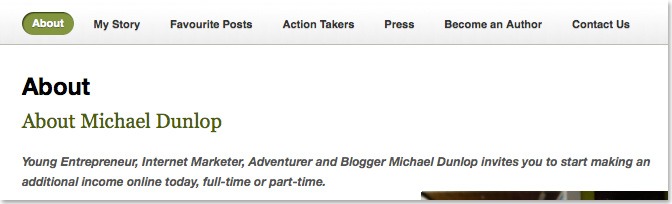
I created My Story page because of the above, if people want to find more about me, then I will give it to them. I created a post exactly how I started my internet business and all the troubles I had. You can do the same for your blog. This is also a great opportunity to build social proof and add in some affiliate links.
3. GDPR Compliance Page
As of 25th May 2018, there are new rules on how you can collect data.
One change that we have had to make is adding a page to our websites where users can learn what we do with their data and a contact form for getting access to any data we hold of theirs.
4. Privacy Policy Page
A Privacy Policy agreement is required by law if you’re collecting personal data from your users. This includes name, address, email, credit card details and so on.
As this is a legal requirement, I recommend you use TermsFeed Privacy Policy Generator to automatically create a policy for your website.
5. Terms and Conditions Page
Important for outlining the rules you set out for using your website.
This is a legal document – we used TermsFeed to generate a Terms and Conditions agreement for us.
6. Press Page
Press can be really important for the success of some blogs. The more press write ups, interviews and mentions, the most traffic you will get. Having a press page is a great way to highlight all the times you get mentioned, this is great for branding.
7. Squeeze Page
We get email subscribers from a popup, opt-in boxes and a squeeze page. A squeeze page is like a sales page, but for your email list.
Often we link to this page in blog posts and our subscribers also like to link to it. If you have a great free gift, subscribers will tell people about it. If you simply have an optin box on your sidebar, they will have to say, go find it and sign up, which doesn’t work as well.
For collecting and sending emails to my readers, I use Aweber – I highly recommended it, one of the best investment for your business.
8. Thank You For Subscribing Page
Once people sign up for your squeeze page, it’s really important to send them to a thank you page to remind them to confirm their email address and give them further information on what they are about to receive.
This is an important page if you want to increase conversions.
9. Confirmation Page
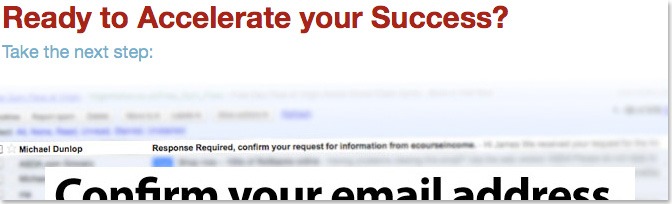
Subscribers will have to confirm they want to be on your list, if you are using double opt-in. Aweber will send them an email asking them to do this. When they click the link in this email, they can either go to a default Aweber page, or they can go to a custom confirmation page that you created.
This is another opportunity to send them back to your site, perhaps download your gift and mention other great posts on your site.
10. Already Subscribed Page
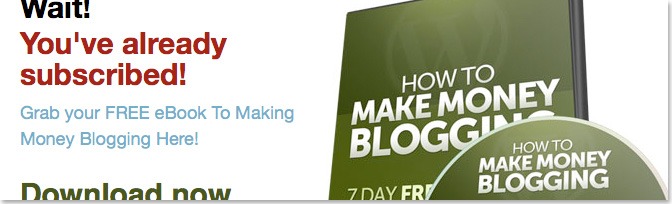
Often, subscribers will try subscribing again. They may of forgotten they signed up or they may want to try download your free gift again. Remember, the free gift will make you money so make it easy for them to find it, if they have lost it.
Here you will notice I have a big copy of my eCover, to show some perceived value of the FREE course:
11. Subscriptions Page
If they love what you are offering, they will want to come back, so make it easy for them to subscribe.
If you have Aweber you can allow them to sign up for your newsletter and for blog post updates. I would also recommend mentioning your social networking links such as Twitter and Facebook .
12. Comparison Page
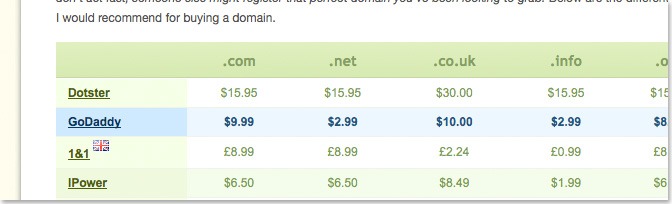
Often I promote services and company’s that I use and recommend. Some readers will want to look else where for a better deal. This is when the comparison page comes in, here you compare your offer with a bunch of other services. They should go for your recommendation, but if they go for a different one, you will still receive a commission for it.
13. Resources Page
The idea of a resources page is to promote your favorite and highest converting products. We use this page to show our readers what products we are using to build our sites. If they like our sites and want to build something similar, they will want to use the same services and products we do.
14. Contact Page
Readers, customers, advertisers, press, will want to contact you, so make it easy for them. I also highly recommend you mention other pages such as affiliate login page, FAQ’s, your subscription page and your social networking links.
15. Sitemap/Archive Page
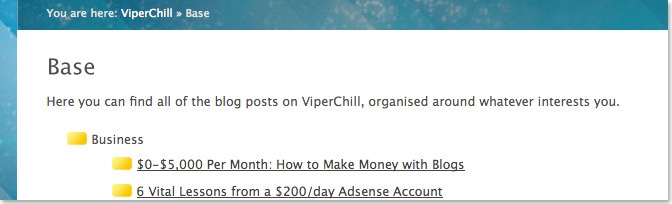
We created this page for search engines and usability. Search engines must be able to find all your pages, having a Sitemap allows them to crewel your website more easily.
When I visit blogs that I have never visited before and I find a couple great posts, all I can think about is finding more and more because it’s benefiting me. Having an archive page makes it easy for new readers to look back over all past posts you have, click here to see ours.
16 Advertise Page
If you do offer advertising on your website, you want an advertising page. Not some typical page like everyone else, but something that helps and answers any questions potential advertisers may have.
17. Favorite Posts Page
The longer someone spends on our sites, the more likely they are to subscribe and buy from us. It’s important to show recent and popular posts on your site. We like to have a page where we share our favorite posts, the articles that we find readers enjoy the most.
18. Your Questions Answered/FAQ’s
Often I’m asked the same question, over and over again. Having a FAQ’s page is a great way to save time.
When people email you asking a question you have already answered, simply link to this page. We do this a lot with our documentation for our software product, PopUp Domination.
19. 404 Page
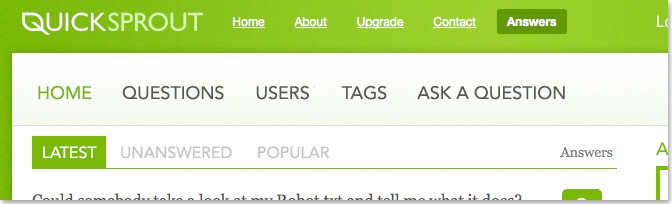
So often I find myself on broken pages on other peoples websites and I’m guessing I’m not alone. Having a customized 404 page allows you to tell readers what to do next when they do land on a broken page. We show recent posts on our 404 page.
Other Pages I’m Now Using
Tags Page
This is a new trick I’m using, basically I have sub links under each category, to take people to other pages and posts. One thing I wanted to do is show all the interviews in that category, I didn’t want to have posts in two category’s though. So what I did was I tagged all the posts I wanted with “Interviews With Bloggers” then I linked to the tag page and used that as a sort of category page.
Changing Posts into Pages
Top converting posts, turn into pages, another great read from Yoast. Basically in some cases, having an article as a page will destroy it’s link density so you can’t rank as high in search engines, read more here.
Products and Consulting
Some of you have products, services and offer consulting, showcasing this in a blog page can be very good. One of my favorite examples is Sitepoint and how they sell their products through their website, check that out here.
Affiliates & Support
If you are doing the above, then having affiliates can be a real driving force for your business. They basically sell your products on their websites for a commission. Support comes in handy because it makes things more organized and I’m convinced most people use it because it will decrease the amount of emails and requests from readers and customers as it makes it harder for them.
Earnings Disclaimer
Anyone talking about money and how much they are earning needs one of these, just do they don’t get into trouble. Here is a what mine looks like.
Read more: ’17 Writing Tips For Bloggers Who Think They Can’t Write!’

Check out our must read articles about Blogging:
-

How To Use ChatGPT To Critique Your Sales Copy and Get More Clients -

Blogger Profile: How Neil Patel Makes Millions with Quick Sprout -
10 eCommerce Trends Every Blogger Needs To Know About! -
23 Writing Tips For Bloggers Who Think They Can’t Write! -
New WordPress Install – 20 Things You Must Do [Checklist] -
11 Reasons Why Your Blog Isn’t Making Money and What To Do About It -
15 Editing & Proofreading Tips Every Blogger Should Know -
11 Ways to Fake Your Way To Guru Status!




![New WordPress Install – 20 Things You Must Do [Checklist]](https://eadn-wc04-1126528.nxedge.io/wp-content/uploads/2016/09/new-wordpress-install-2016-210x120.jpg "New WordPress Install – 20 Things You Must Do [Checklist]")


As always incredible advices ! Merci depuis la France ! 😉
Well. Thanks for the inputs.. I’m having most important page in my blog. But past 2 years I didn’t updated my contact and about us page. Basically I’m the top ten lazy blogger of the Year 2010. lol 🙂
Good tips Michael, good to see the advanced page is coming together – those buttons look familiar 😉
I’d definately also agree that you need to ensure your blog is making pages for your tags, I’m getting a lot of SEO traffic from my blog post tags
~James
Oh your going to call me out on my design? I think I could easily match that with a whole list of things.
Lets face it though, if something works, you might as well copy it, that’s why so many people copy parts of my design and I’m sure you get the same for your landing pages – it’s proven to work.
Mike
Great post Michael. Would you mind answering a few questions the this post raised for me?
1. Who did you blog design? How much should I expect to pay for a design like this? I love all of your custom graphics.
2. How did you create the table on this page – ? I love how it looks.
3. At times I have been tempted to re-publish some of my older posts to allow new readers to read them on my homepage again. Do you think that this could hurt the Google ranking of these posts to republish them using the WP scheduler feature?
Thanks for your help
Hello,
James Deer Design did my design work, UK based. Typical rate is around £30 a hour and design can take around a day followed by 3 or so working days for programming depending on how must work you get done.
As for the table, I got my designer to create that as well.
If you are republishing this will not be the best thing to do, either feature your posts at the top of your homepage or edit post date to the time right now so they are seen as most recent posts when people visit your site.
Hope that helps,
Michael
Hi, for question number 2 you should use css to create that table type layout. If you want me to do it for you for cheap contact me via the contact page on my site.
Comparison page is on its way, the Archive page is a great idea and one I’ve never thought of.
The Subscribe PAGE is interesting and I will be looking to add a link to that in after every blog post.
I absolutely agree with what you said about the Contact Page, you want to be putting that idea of why they should contact you in their head.
A Squeeze page is a must too.
I am also going to change my resources page to include the highest converting products too.
Thanks Michael, this has helped so much 🙂
Hey Awesome Post man. !
Exactly right bro “Every Blogger needs to have these pages”.
Currently i am working on Faq and comparison page. !
Last week i created resources page.
Thanks for sharing this great post .!!
Nice list. I have most of these and I can say as of today I am at about 8 pg views per visitor.. the right pages makes a difference.
Hey Micheal, great post . You’ve got all sorts of marketing strategies. Keep up
Great post you got here Michael. I never thought about it before, but having a “My story” page could draw some great inspiration to your readers. And like you said in a previous blog post you wrote inspiration is a way to encourage people to get out there and buy your stuff because there motivated.
That’s a very impressive post and I haven’t even thought about incorporating some of those pages until you mentioned it. Also, it helps improve some of the pages I already have.
Another great post, very informative, I consider this and will apply it to my blog. Is it necesarry to separate the “My Story” page or just incorporate it to “About Me” page?
Great job Michael
Lots of great common sense stuff Michael – yet so easy to overlook. Thanks Michael
Michael, as always a pleasure to read your posts. The info that you give is priceless.
Michael, very detailed post. I’ll have to ‘print’ this and see what I can take away from it, esp. while I design my site.
Thanks for this!
Had an idea about some of these, but there are some that are new to me. Makes so much sense!
thank you for this great post! I”m 3 months into my blogging and find this information to come at a valuable time for me. I always find success when I implement your strategies…..thanks so much!
Again A nice one. I have got almost all the pages you mentioned. Maybe one or two are missing. Will work on it. thanks.
I think the press page is one of those pages that should come hand and hand with your “About” and “Contact”. Very few people have them and it would make it a lot easier for me to share their stories if I had access to a press page with their logo and professional photos. I’ll be making mine sometime in the next few weeks 😉
Another superb post, Michael! Keep it up.
Your blog is very cool right now; I remember that just a few weeks ago it was pretty different. But I think that a lot of pages, a lot of information not always are the best choice, because this can make people confused with so many information sources.
Remember, sometimes less is more.
I am thankful for your consistently providing quality information for the new blogger. I will be bookmarking this article and making these improvements.
You always did great post Micheal.
It’s bad for us blogger who don’t building our list because we can’t use those squeeze page.
Thanks for sharing this.
– Felix Albutra
Hi Michael,
Thanks for this great post, I have bookmarked it and will come back to this page a few times while I am learning. I think this one is one of the most reliable source for blogging and ideas for getting the most out of blogs.
Thanks again.
Great post Michael. Your new theme and style looks cool too. happy blogging
That’s a really valuable list Michael. It’s going straight to my bookmarks. The only thing I would add is a “guest post guidelines” page.
Wonderful advice, I definitely need to work on a lot of them on the list.
Thanks Michael for the informative post.
It’s a great reminder as sometimes we are so engrossed with creating the content that we missed out these pages. They should be equally as important as the content.
I”m curious how come you didn’t include privacy, disclaimer and disclose pages, aren’t they important if you are affiliate marketer? They come in handy when come to legal issues.
Thanks Michael, I enjoyed this one yet again. Informative.
Michael, I’m somewhat confused whether the above has been written for websites/e-businesses that have affiliates (hence, the good recommendation to have an affiliate program bio page), or for those that are acting as affiliates themselves (hence, the fully appropriate “Earnings Disclaimer” page also mentioned above). I think it’d be good to clarify that it’s gonna be and “either, …or”, as opposed to “both, …and” scenario.
Great list of pages that every blogger must have! We also can’t forget about constantly taking a look at our blog analytics to see what posts our readers find particularly interesting. That can also give us some insight on the types of posts to continue with in the future.
Hey Michael
great post and some good advice to learn from.
Do you ever delete old content from your blog?
also backing linking should you just use the main url or use the extended url that takes people to that page?
many thanks
Great post you got here Michael.having a “My story” page could draw some great inspiration to your readers. And like you said in a previous blog post you wrote inspiration is a way to encourage people to get out there and buy your stuff because there motivated.
Well Michael,
You amaze me. I happened to come across your blog and this one really made me rethink about blogging.
Thanks
Brilliant tips & advice Michael.
Will bookmark and revisit as much as I can to remind myself everytime I create a new site.
Great stuff, I was wondering how to increase my page views! I dont have the traffic i wish yet.